Guide
Use Cases
With URL Scraping & AI Extraction, you can unlock many use cases, such as:
- Company research
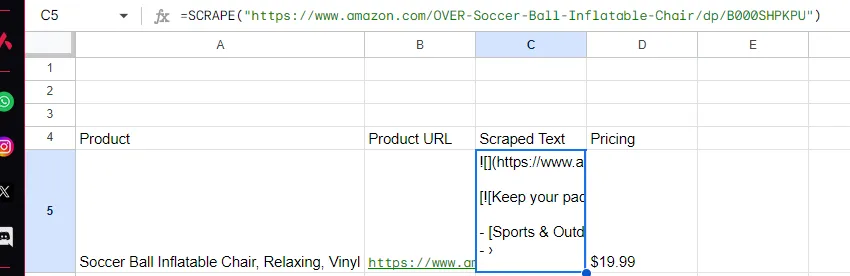
- Use SCRAPE() in column C to get the content of the URL
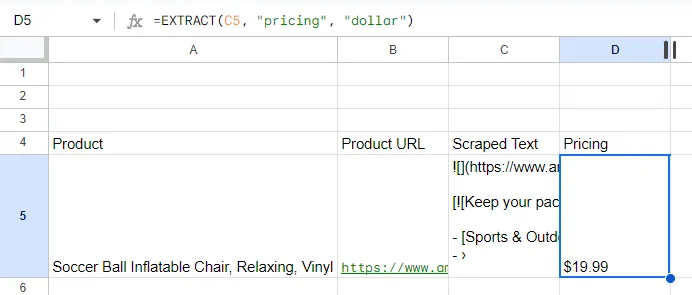
- Use EXTRACT() in column D to extract relevant information from column C, such as “deal size” in number format
Formulas
Here are formulas you can use in GPTSheetsPlus
SCRAPE
The SCRAPE function scrapes content from a given URL and converts it to markdown.
Usage:
=SCRAPE("https://example.com", 5)
- “https://example.com”: The URL to scrape content from.
- 5: The wait time for the page to load (optional, default is 0).
EXTRACT
The EXTRACT(text, what_to_extract, format: optional) function extracts specific information from a given text.
Example:
=EXTRACT(A1, "year", "number")
- A1: Cell containing the text.
- “year”: We’d like to extract the “year” from all the text (the text contains a year that we’d like to extract).
- “number”: The format of the extracted information, which is in the form of “number” for “year” (optional).
SCRAPEANDEXTRACT
The SCRAPEANDEXTRACT function combines scraping and extraction in one step. It scrapes a URL and then extracts specific information from the scraped content using AI.
Usage:
=SCRAPEANDEXTRACT("https://example.com", "product price", "number", 5000, false)
- “https://example.com”: The URL to scrape content from.
- “product price”: Description of what information to extract from the scraped content.
- “number”: The format of the extracted information (optional, default is “string”). Can be “number”, “string”, “date”, etc.
- 5000: The wait time in milliseconds for the page to load (optional, default is 0).
- false: Cache control - set to TRUE to bypass cache, or provide a number (in seconds) for max age (optional, default is false).
Example:
=SCRAPEANDEXTRACT("https://example.com/product", "price", "number")
This will scrape the product page and extract the price as a number.
GPT
The GPT function generates a response from the OpenAI GPT-4 API based on a given prompt and an optional system prompt.
Usage:
=GPT("your prompt here", "your system prompt here (optional)")
- prompt: Your prompt.
- system prompt: System prompt (optional)
Firecrawl
The Firecrawl function scrapes content from a given URL and converts it to markdown.
Usage:
=Firecrawl("https://example.com", 5)
- “https://example.com”: The URL to scrape content from.
- 5: The wait time for the page to load (optional, default is 0).
Troubleshooting
- License Activation: Ensure your license key is valid and correctly entered.
- API Key Not Found: Make sure you have entered the correct API key in the respective menu options.
- Function Errors: Check the inputs and format of the function you are using. Ensure all required parameters are provided.
For further assistance, visit our support page or contact us at webscraperkit@terrydjony.com. I’m in GMT+7 timezone, so please wait for some time if it’s still night time in my time.